


- CompressConvertAI PDF
- Organize
- View & Edit
- Convert from PDF
- Convert to PDF
- SignMoreScan
How To Convert PDF to PPTX (Quick & Easy)
Convert PDF to PPTX in a few clicks. Turn static pages into editable slides, while keeping your presentation layout, fonts, and images intact.
More on PDF to PPT
More on PPT to PDF
If you want to present content that currently lives in a PDF, converting it to PPTX is the simplest way to edit, rearrange, and add visuals. With our PDF to PPTX feature, you upload a file, wait a moment, then open a ready-made PowerPoint deck you can fully customize.
Below, we start with a quick checklist, then walk through a clear step-by-step workflow, advanced options, troubleshooting tips, and FAQs.
Quick start: Use the converter below to upload or drag-and-drop your PDF and download it as a PPTX.
Quick Checklist: Convert PDF to PPTX Fast
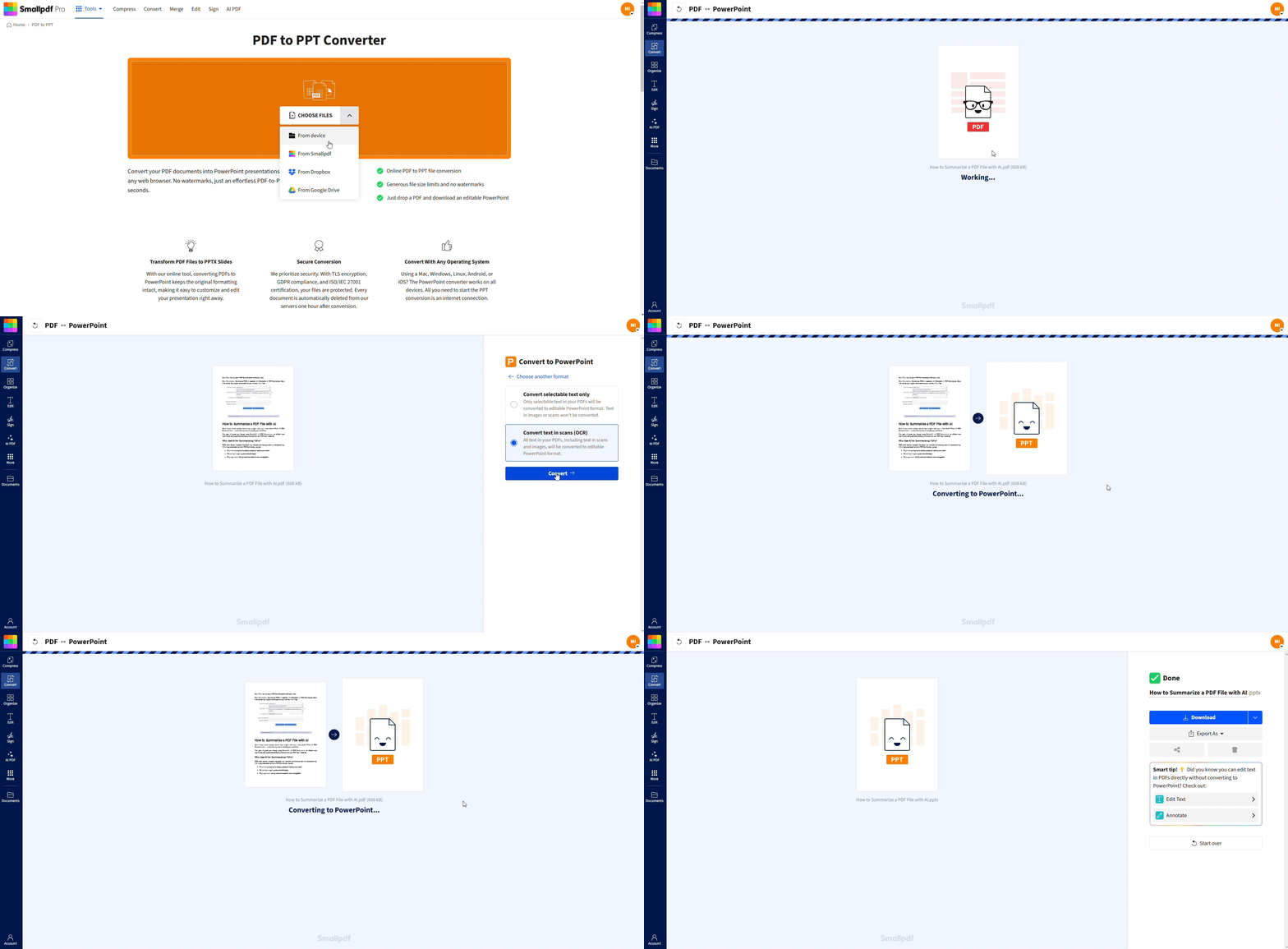
How To Convert PDF to PPTX Online (Step-By-Step)
Converting PDF to PPTX with us works on any device and does not require installation.
Step 1: Open the PDF to PPTX converter
Select PDF to PPT.
Start here: Upload your PDF in the converter below to turn it into an editable PPTX
You will see a large upload area and cloud options like Google Drive, Dropbox, and OneDrive.
Step 2: Upload your PDF
Click “Choose Files” or drag and drop your PDF into the upload area.
You can upload:
Single-page PDFs
Multi-page reports
Scanned documents (with OCR if you have Pro)
Step 3: Let us convert PDF to PPTX
The conversion starts automatically after upload.
Our system maps pages, detects text blocks, and places images on slides.
For scanned PDFs, OCR runs first, so text becomes editable where possible.
Step 4: Download and open your PPTX
When the processing finishes, click “Download” to save the PPTX.
Open the file in:
Microsoft PowerPoint
Google Slides
Other compatible presentation apps
You now have an editable slide deck instead of a locked PDF.
Why Convert PDF to PPTX?
Turning a PDF into PPTX is about control and flexibility.
1. Turn Static Documents Into Editable Slides
Edit headings, bullet points, and charts directly on each slide.
Reorder or hide slides without changing the original PDF.
Add speaker notes, animations, and transitions to match your presentation style.
2. Reuse Content Across Presentations
Copy slides into existing decks or templates.
Mix sections from different PDFs into one unified presentation.
Update numbers, dates, or branding without asking for the original source file.
PPTX is the native format for PowerPoint, so you keep full compatibility with modern presentation workflows.
Key PDF to PPTX Features in Smallpdf
Our converter focuses on keeping your slides clean and professional.
1. Formatting Preservation
Maintain fonts, text boxes, and basic layout structure.
Place images in the right position on each slide.
Keep page-to-slide mapping clear, especially for reports.
You may still want to fine-tune, but most of the heavy lifting is done for you.
2. OCR for Scanned PDFs (Pro)
Detects when a PDF is image-based.
Runs OCR so text becomes selectable and editable.
Helps you avoid rebuilding slides from scanned reports by hand.
3. Batch Conversion and Cloud Storage
Pro users can convert multiple PDFs to PPTX in one go for recurring reports.
You can import from and save to Google Drive, Dropbox, and OneDrive.
This makes it easier to keep presentations in the same cloud folders as your PDFs.
Troubleshooting Common PDF to PPTX Issues
If your slides do not look exactly like the PDF, these tips can help.
Slides Look Different From the PDF
Check font availability on your computer and install missing fonts if needed.
Adjust slide size in PowerPoint (for example, switch between 16:9 and 4:3).
Use layout tools in PowerPoint to realign text boxes and images.
Fonts or Images are Missing
If specific fonts do not appear, replace them with similar system fonts.
For missing images, confirm they were present in the original PDF and not blocked.
Reinsert key graphics manually if they were highly custom or embedded in unusual ways.
File Is Too Large or Slow to Open
Run Compress PDF before converting to reduce the size of image heavy PDFs.
After conversion, remove unused slides or media assets in PowerPoint.
Save a copy of the PPTX with unnecessary content removed for faster sharing.
Compare PDF to PPTX Conversion Options
Here’s a quick look at how different methods stack up.
| Method | Best for | Pros | Cons |
|---|---|---|---|
| Smallpdf PDF to PPTX | Most users and mixed PDFs | Online, OCR support, good formatting, cloud connections | Needs internet connection |
| PowerPoint “Insert PDF” | Simple PDFs with few pages | Built into PowerPoint, no extra sign-up | Limited control, not a true full conversion |
| Manual screenshot + insert | Single visuals or charts | Full visual control slide by slide | Slow, no editable text |
For full decks and repeat work, our PDF to PPTX feature usually offers the best balance of speed and editability.
More Tools For Your Presentation Workflow
You rarely stop at one conversion, so we connect PDF to PPTX with other features.
Before And After Conversion
Use Compress PDF to shrink heavy PDFs before sharing or converting.
Use Merge PDF to combine several reports, then convert once into a single deck.
Use PPT to PDF later if you need a final, read-only version for distribution.
Use the AI Question Generator to create engaging questions based on your content.
Build Content Beyond Slides
Use PDF to Word to reuse text in handouts or reports.
Use PDF to JPG to turn pages into images you can drop into existing slides.
Use AI PDF Summarizer to extract information from long PDFs and pull only the key points into your slides.
This keeps your entire document and presentation workflow inside one consistent space.
Turn PDFs Into Editable Presentations With Smallpdf
You do not need to rebuild presentations every time someone sends a PDF. With our PDF to PPTX feature, you can upload files, get a ready-made slide deck, and then refine content for your audience.
When you are ready, open PDF to PPT on Smallpdf, convert your next PDF into PPTX, and turn static pages into dynamic, editable slides in minutes.
Want to Convert PDF to PPTX
FAQs About Converting PDF to PPTX
How do I convert a PDF file to a PowerPoint presentation?
Open our PDF to PPT feature, upload your PDF, wait for the conversion to finish, then download the PPTX file and open it in PowerPoint or Google Slides. You can then edit every slide.Can I convert a PDF into individual slides?
Yes. Each page in your PDF becomes at least one slide in the PPTX. Long pages may be split or require manual adjustment, but you will not need to rebuild everything from scratch.Can I insert a PDF inside an existing PPTX?
You can convert the PDF to PPTX first, then copy the slides you need into an existing deck. This gives you more control than simply embedding the PDF as an icon or object.Can I convert PDF to PPTX for free?
You can use our PDF to PPT feature for free with daily limits. If you convert many files or need batch processing and OCR on a regular basis, a Pro plan unlocks more capacity.How do I create a PPTX file from scratch instead of a PDF?
Open PowerPoint, choose a blank presentation or template, and start building slides. You can always convert the PPTX to PDF later with PPT to PDF on Smallpdf when you want a fixed, shareable version.Create editable PPTX files from PDFs in seconds with Pro
Related Articles
