


- CompressConvertAI PDF
- Organize
- View & Edit
- Convert from PDF
- Convert to PDF
- SignMoreScan
- Home
- ›
- ›How to Identify Fake Documents With Visual Checks, Metadata, and AI Tools
How to Identify Fake Documents With Visual Checks, Metadata, and AI Tools
Learn to spot fake documents with a step-by-step guide covering visual checks, metadata analysis, and AI tools to protect against fraud.
Document tampering has become easier because most files now move through digital channels. Small edits (swapped numbers, altered dates, replaced logos) can pass unnoticed unless you know what to check. Strong verification helps you avoid financial and legal trouble.
If you’re reviewing long documents and need to quickly grasp the key details, AI-powered PDF tools can generate summaries that might help you spot inconsistencies faster.
Quick-Check Guide on How to Identify a Fake Document
Use these fast checks before you go deeper into verification:
Check for layout and font consistency. Look for mismatched fonts, spacing, or alignment issues.
Inspect logos, seals, and security features. Blurry images, missing watermarks, or low-quality seals are warning signs.
Review structure and totals. Page numbers, headers, footers, and calculations should line up across the file.
Look at metadata. Confirm creation dates, modification dates, and author details match the document.
Compare against trusted records. Cross-check details with the issuing authority or earlier versions of the same document.
Check for scan manipulation. Uneven sharpness, strange blurs, or text that looks “pasted on” may signal edits.
Validate signatures and dates. Compare against known examples and ensure timelines make sense.
Use PDF tools for deeper inspection. Convert to Word to expose formatting changes or use OCR to inspect text hidden in scanned images.
Want to Create an AI PDF Summary?
What Is Document Fraud?
Document fraud is the illegal creation, alteration, or misuse of official documents to deceive others for personal or financial gain. This includes everything from fake IDs and forged bank statements to altered contracts and backdated invoices.
These fraudulent documents can lead to identity theft, financial losses, and serious legal consequences for both victims and perpetrators.
Types of Document Fraud
Understanding the main types of document fraud helps you know what to look for:
Forgery: Altering genuine documents by changing names, dates, amounts, or signatures.
Counterfeiting: Creating completely fake documents designed to look like real ones.
Fraudulently obtained documents: Getting genuine documents through theft, bribery, or corruption.
Misuse of valid documents: Using someone else’s real documents, like stolen passports or IDs.
Common Fraudulent Documents
Some documents are targeted more often than others because of their value or ease of manipulation:
Passports and government-issued IDs
Bank statements and financial records
Invoices and receipts
Educational certificates and diplomas
Employment verification letters
Utility bills and proof of address documents
How to Identify Fake Documents (Step-by-Step)
Here’s a systematic approach to verify document authenticity. Don’t rely on just one check—use multiple methods for better accuracy.
Step 1: Visual Checks (Layout, Fonts, Alignment, Logos, Security Marks)
Start with what you can see. Look for these visual red flags:
Inconsistent fonts or font sizes throughout the document
Misaligned text or uneven spacing
Blurry or pixelated logos and official seals
Missing or altered security features like watermarks or holograms
Color variations that don’t match the original format
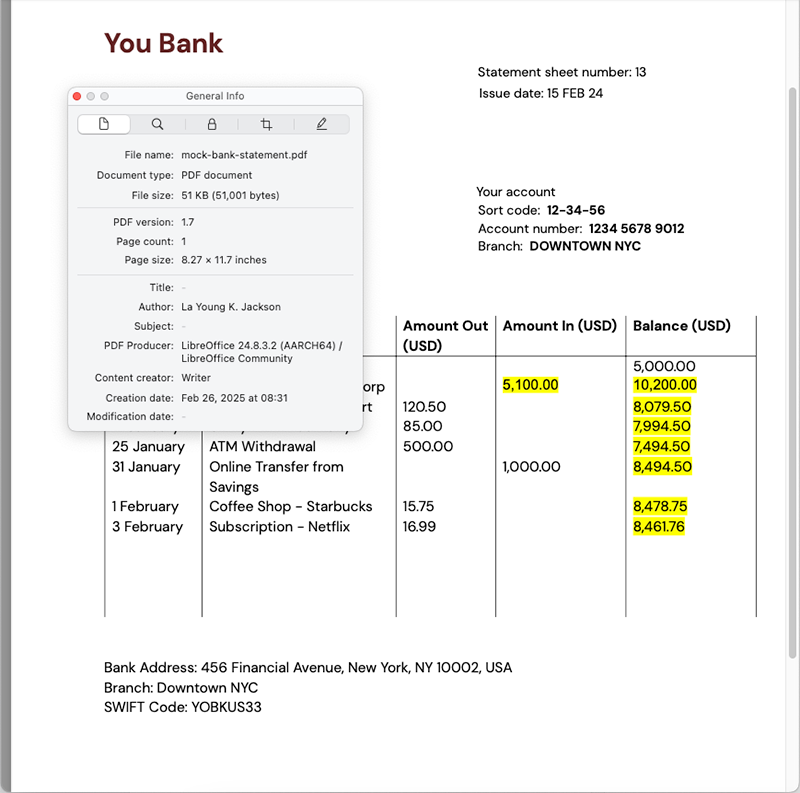
Step 2: Structural Checks (Consistency Across Pages, Pagination, Totals)
Examine the document’s overall structure and flow.
Check that page numbers follow a logical sequence.
Verify that totals and calculations add up correctly.
Look for consistent formatting across all pages.
Ensure headers and footers match throughout.
Step 3: Metadata and File Properties Checks
Digital documents contain hidden information that can reveal tampering.
Check creation and modification dates in file properties.
Look for unusual software or author names in metadata.
Compare file creation dates with document dates.
Notice if the document was created with unexpected software.
Step 4: Cross-Referencing With External Records
Verify information against independent sources.
Contact the issuing organization directly.
Check official databases when available.
Compare with previous documents from the same source.
Verify signatures against known examples.
Step 5: Handling Scans and Re-Scans (Pre-Digital Tricks)
Be extra careful with scanned documents—they can hide digital alterations.
Look for inconsistent image quality across different sections.
Check for unusual blurriness around key information.
Notice if some text appears clearer or sharper than others.
Watch for signs that the document was printed and re-scanned.
Step-by-Step: Verify Bank Statements and Invoices
Financial documents need extra scrutiny. Here’s how to check them properly:
Check the math: Verify all totals, balances, and calculations.
Look for font consistency: All text should use the same fonts and sizes.
Examine transaction patterns: Look for unusual or suspicious entries.
Verify contact information: Confirm bank details and company information.
Cross-check dates: Ensure statement periods and transaction dates make sense.
Use conversion tools: Convert PDFs to Word to check for embedded vs. image text.
Step-by-Step: Verify IDs and Certificates
Identity documents have specific security features to check.
Examine security features: Look for holograms, watermarks, and special inks.
Check photo quality: Ensure photos are properly embedded, not pasted on.
Verify issuing authority: Confirm the document comes from the right organization.
Test physical features: Feel for raised text or special textures.
Compare format: Check against known examples of legitimate documents.
Validate information: Ensure personal details are consistent and logical.
Tools and Workflows to Verify Documents Fast
The right tools can speed up your verification process and catch things you might miss.
Make Scans Searchable With OCR
OCR (Optical Character Recognition) helps you analyze text in scanned documents. When you convert images to searchable text, you can spot inconsistencies more easily. Try Smallpdf’s OCR tool to extract text and check for formatting irregularities.
Summarize and Translate With AI to Spot Mismatches
AI tools can quickly summarize long documents, making it easier to spot inconsistent information. Use Smallpdf’s AI summarizer to get key points and identify potential red flags in complex documents.
Convert to Word to Inspect Formatting and Edits
Converting PDFs to Word format reveals hidden formatting issues and editing traces. This helps you see if text was added later or if different fonts were used. Convert your PDFs with Smallpdf to inspect the underlying structure.
Prevention Tips for Teams That Handle Documents
Protect your organization with these best practices:
Train staff to recognize common fraud indicators.
Implement verification procedures for all important documents.
Use multiple verification methods, not just visual inspection.
Keep records of verification steps and results.
Establish clear escalation procedures for suspicious documents.
Regularly update your fraud detection knowledge and tools.
Is Document Fraud a Crime? (and Typical Penalties)
Yes, document fraud is a serious crime in most jurisdictions. Creating, altering, or using fraudulent documents can result in felony charges, especially when used for identity theft or financial gain.
Penalties typically include fines, restitution to victims, and potential jail time. The severity depends on the type of document, the amount of damage caused, and local laws.
New Trends in Document Fraud (Templates, GenAI, Synthetic Identities)
Fraudsters are getting more sophisticated. Watch out for these emerging trends:
Template farms: Websites selling customizable fake document templates
AI-generated content: Using artificial intelligence to create realistic fake documents
Synthetic identities: Combining real and fake information to create new identities
Automated fraud: Software that can quickly generate hundreds of fake documents
Verify Faster With Smallpdf (OCR, AI, and Simple Tools)
Document fraud is getting more sophisticated, but the right tools and techniques can help you stay ahead. Whether you’re checking financial records, verifying IDs, or reviewing contracts, a systematic approach combined with helpful tools makes verification faster and more reliable.
Smallpdf’s OCR, AI summarization, and conversion tools can streamline your verification process. From making scanned documents searchable to revealing hidden formatting issues, these tools help you catch what manual review might miss.
Start your free trial to access all Smallpdf tools and protect yourself from document fraud.
Frequently Asked Questions
How can I tell if a PDF has been edited?
Start with the file’s metadata. Look at the creation date, modification date, and the software used to create the document. If the file claims to be an official record from 2021 but the metadata shows it was created last week, that’s a warning sign. You can also convert the PDF to Word with Smallpdf to reveal hidden formatting changes or mismatched fonts that suggest edits.Are scanned documents easier to fake?
Yes. Scanned files can hide digital edits behind a flat image. Look for uneven sharpness, strange blur patches around numbers or names, or sections that look “cleaner” than the rest. Use OCR to turn the scan into searchable text. This can make inconsistencies stand out more clearly.What’s the safest way to verify a document’s authenticity?
Use multiple checks. Combine visual inspection, metadata checks, structural review, and direct confirmation with the issuing authority. A single step may miss something, but a layered approach gives you a more reliable answer.Can AI-generated documents be detected?
Often yes, but they require closer inspection. AI-generated files may show unusual spacing, inconsistent tone, mismatched dates, or metadata that doesn’t align with the document’s content. Summarizing or translating the PDF with AI can help you spot mismatches in names, numbers, or timelines.What should I do if I suspect a document is fake?
Pause the process it relates to and verify it through a trusted source. Contact the organization that supposedly issued it. Keep a record of your checks and avoid relying on the document until you receive confirmation.Can Smallpdf help me check documents for fraud?
Yes. OCR helps you uncover hidden text inside scans. Converting PDFs to Word exposes formatting changes or added content. AI summarization can highlight inconsistencies across long files. These checks don’t replace legal verification, but they make your review faster and more reliable.Review document metadata and format issues faster with Smallpdf
