


- CompressConvertAI PDF
- Organize
- View & Edit
- Convert from PDF
- Convert to PDF
- SignMoreScan
How To Use AI To Review PDF Files
Use AI to review PDF files fast. Turn long reports into clear, searchable summaries you can share and act on faster. It’s free with no sign-up needed.
AI is now one of the simplest ways to make sense of long PDFs. Instead of scrolling through contracts, research papers, or dense reports, you can upload a file, let AI read it for you, and get the key points in a few seconds. From there, you can ask questions, jump to relevant sections, and export what matters.
Below, we explain what AI can do with PDF files, how Smallpdf’s AI PDF works, and how to use it step by step to review documents smarter, not harder.
What Can AI Do With PDF Files?
AI can do much more than just summarize a PDF. It can help you understand, search, and reuse information in different ways.
1. Summarize And Condense Long Documents
AI can:
Turn a 50-page report into a short overview.
Break down a research paper into sections with key takeaways.
Highlight main conclusions, arguments, and next steps.
This is useful when you need a quick grasp before deciding what to read in full.
2. Search, Answer Questions, and Find Details
With chat-style tools, you can:
Ask direct questions about a PDF.
Locate specific clauses, dates, or figures.
Compare sections and get structured answers.
Instead of scrolling, you treat the PDF like a searchable conversation.
3. Extract, Convert, And Translate Content
AI also supports:
Extracting important paragraphs or tables for reports
Turning scanned images into readable text via OCR
Summarizing PDFs in different languages
This makes it easier to reuse information across apps, formats, and teams.
What Is an AI PDF Summarizer and How Does it Work?
An AI PDF uses artificial intelligence to read your document and surface the most important information. It looks at:
The text itself
How the document is structured
What concepts and entities repeat
For scanned PDFs or photo-based files, PDF OCR (Optical Character Recognition) converts the image into machine-readable text first. After that, natural language processing (NLP) models analyze the content and build summaries, highlight key points, and support question answering.
In practice, that means you upload a PDF, AI reads it in the background for a few seconds, and then you see a clean summary with options to dig deeper.
How To Use AI To Review PDF Files With Smallpdf
Our AI PDF is built into the browser, so you can start reviewing PDFs right away.
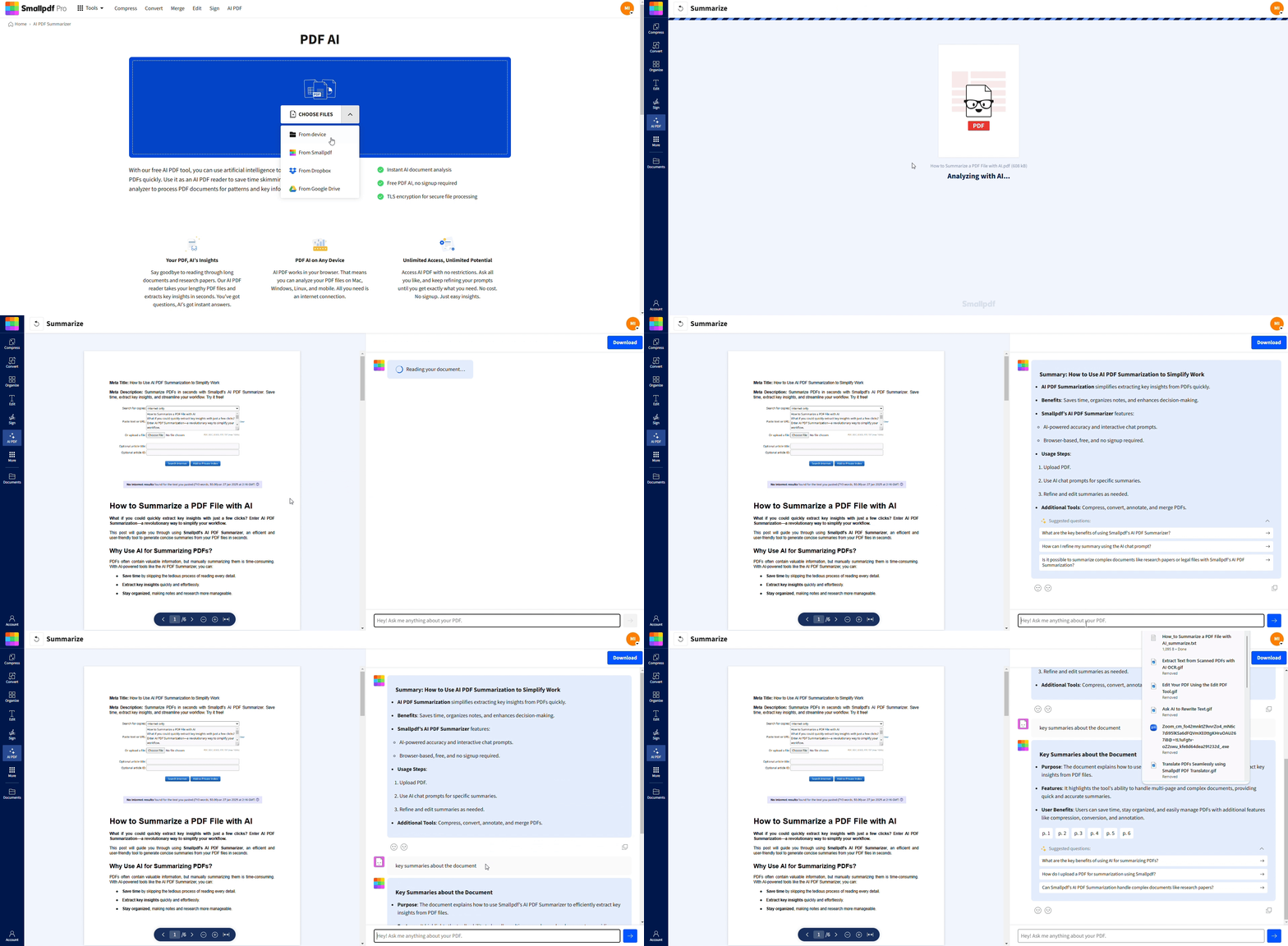
Step 1: Upload your PDF
Go to AI PDF on Smallpdf.
Drag and drop your file, or click to upload from your device, Google Drive, Dropbox, or OneDrive.
The AI works with standard PDFs, Office files that we convert to PDF first, and many scanned documents.
Step 2: Let AI read and summarize
Once uploaded, AI scans the document automatically.
If the file is scanned or image-based, OCR runs first to extract text.
In a few seconds, you see a summary panel with the main points.
You can choose shorter or more detailed summaries depending on how much context you need.
Step 3: Chat with your PDF for deeper review
Chat with your PDF using AI to ask questions about the document.
Try prompts like:
‘What are the key terms of this contract?’
‘Summarize the methodology section.’
‘List the three main risks mentioned.’
Follow up with more specific questions if you need extra detail.
This turns a static PDF into an interactive conversation, so you can jump straight to what you care about.
Step 4: Export and keep working
Use the click to copy button to pull summaries into emails or notes.
Download an updated, searchable PDF once OCR is done.
Export content to other formats, such as Word, when you want to edit or annotate in more detail.
From there, you can combine AI outputs with other Smallpdf features like Compress PDF, Merge PDF, or Protect PDF.
Smallpdf AI PDF Features
Our AI PDF is built to reduce the time you spend reading while keeping you in control of final decisions.
1. Instant AI-Powered Summaries
Get summaries for short memos or large PDFs in seconds. You can skim the overview first and then decide which sections need full reading.
2. Chat With Your PDF
Ask your PDF questions in natural language, and AI points you to the relevant content. This works well for contracts, technical reports, and long research papers where specific details matter.
3. OCR For Scanned PDFs
If your PDF is a scan or a photo, OCR kicks in first. It turns handwriting and printed text into searchable content so the summarizer can still work, even if the original document wasn’t digital.
4. Multilingual PDF Summaries
You can summarize PDFs in many languages and even ask for summaries in a different language than the original. This is helpful for international teams or foreign language papers.
5. Copy, Share, And Reuse Summaries
Every summary and answer comes with a quick copy option. Paste it into slide decks, project docs, or your task manager without switching tools repeatedly.
Real World Ways to Use AI to Review PDFs
AI PDF review fits many everyday workflows, from study to decision-making.
1. Academic Research and Study
Screen research papers before committing to a full read.
Turn chapters into concise study notes.
Ask AI to clarify complex sections or define key terms.
2. Business Reports and Decisions
Summarize monthly or quarterly reports for stakeholders.
Pull key metrics and trends into presentation slides.
Ask AI to list risks or opportunities mentioned in a report.
3. Legal and Compliance Work
Scan contracts for key clauses or deadlines.
Summarize long policies or regulatory guidance.
Use AI to highlight sections that need human review.
4. Training, Onboarding, and Learning
Convert manuals into short guides.
Create quick reference documents from training PDFs.
Summarize long internal documentation for new team members.
You stay in control while AI handles the heavy reading.
Security and Privacy When Using AI on PDFs
Reviewing PDFs with AI often involves sensitive content. We treat those files as securely as any other document in our platform.
Files are encrypted during upload and download.
Storage uses strong security standards and access controls.
Documents are automatically deleted after processing.
We are ISO/IEC 27001 certified and GDPR compliant.
You can use AI to review contracts, internal reports, or personal documents, knowing they are not kept longer than needed for processing.
Review PDFs Faster With Smallpdf AI
Long PDFs don’t have to slow you down. With AI, you can upload a document, get a clear summary, ask targeted questions, and export the insights you need in just a few minutes.
Open AI PDF, upload your next contract, report, or paper, and let AI handle the first pass while you focus on high-value decisions.
Want to Know How AI Helps to Summarize a PDF?
Frequently Asked Questions
Is Smallpdf’s AI PDF free?
Yes. You can use the AI PDF with a limited number of PDFs per day for free. If you review documents regularly or handle very large files, a Pro plan unlocks higher limits and more intensive usage.What AI can analyze PDF files?
Many tools can analyze PDFs, including browser-based AI assistants, office suite add-ons, and note-taking apps with built-in AI. Smallpdf focuses specifically on PDF workflows, combining summarizing, chat-based review, OCR, and classic PDF features like compressing, merging, and protecting documents.How accurate are AI generated PDF summaries?
Summaries are usually very close to the main ideas in the document, especially for clear, well-written text. AI can miss nuance or tone in complex legal or technical contexts, so we always recommend treating summaries as a guide and checking original sections before making important decisions.Can it summarize scanned or image based PDFs?
Yes. OCR extracts text from scans and photos before the summarizer runs. If the scan is very low quality or handwriting is hard to read, certain lines may be skipped or misread, but most clean documents work well.What are the limitations of AI when reviewing PDFs?
AI cannot replace professional judgment. It can misinterpret ambiguous language, overlook rare edge cases, or simplify complex arguments too much. It also does not provide legal, financial, or medical advice, even when reading documents in those areas.Which file formats does the PDF summarizer support?
You can upload PDF files directly. You can also upload Word, PowerPoint, and Excel files, which we convert to PDF behind the scenes so AI can analyze them in the same interface.Is my data safe with AI PDF tools?
Yes. We encrypt file transfers, store data securely during processing, and remove files automatically after completion. We do not keep your PDFs for training or manual review.Are there file size or page limits?
There are limits based on plan type. Free use covers typical documents like standard reports and research papers. Pro accounts can handle much larger files, such as long books, multi part contracts, or full project documentation bundles.Can I customize the summary length?
You can choose more concise or more detailed outputs, and you can always refine results by asking follow-up questions in the chat. For example, you might request “short executive summary” or “detailed breakdown of section 4.”Does it work with PDFs in other languages?
Yes, we support over 20 languages, including Spanish, French, German, Chinese, Japanese, and more. You can even get summaries translated into your preferred language.Review PDF files faster with Pro AI tools
Related Articles
